Event Parking Permits allow eligible residents and businesses within the Burswood Peninsula area to park near their properties during major events at Optus Stadium. Permits are issued digitally through the ePermits system and are linked to vehicle registration numbers.
There is no physical permit required to be displayed.
Proof of address or business registration may be required.
Event Parking Permits provide an exemption to parking restrictions within designated areas of the Burswood Peninsula during major Optus Stadium events.
Event dates are published on the Optus Stadium website.
What are event permits, and where do they apply?
Event Parking Permits allow eligible residents and businesses within the Burswood Peninsula area to park near their property during major events held at Optus Stadium. Event dates are published on the Optus Stadium website: https://optusstadium.com.au/whats-on
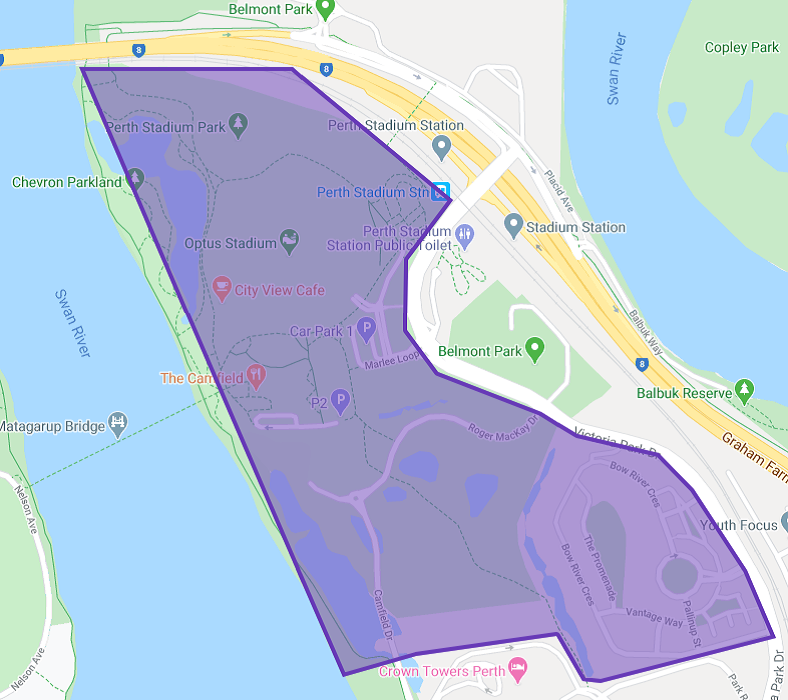
Please refer to the Burswood Peninsula Event Parking Map to see where permits apply.
Who can get an event parking permit?
Event permits are available to:
• residents living within the Burswood Peninsula area
• businesses located within the Burswood Peninsula area
Applicants may be required to provide documentation confirming their residential or business address.
How long do event parking permits last?
All Event Permits expire 12 months after the date of issue.
How do I get an event parking permit?
Applications are submitted through the Town’s ePermits online portal.
To apply you will need:
• an email address
• your vehicle registration number
• proof of address or business location
• a valid debit or credit card for payment
How many permits am I entitled to, and what is the cost?
Residents and business owners are entitled to one event permit per residential/business address.
Do I need to display a permit on my vehicle?
No. Event permits are digital and linked to your vehicle registration.
There is no physical permit required to be displayed on your vehicle.
How do parking officers check my permit?
Parking officers verify permits electronically by checking the vehicle registration number using their enforcement devices.
Can I update or change my vehicle registration?
Yes. You can update your vehicle registration through your ePermits account if your vehicle changes.
Are there any vehicles that are not eligible for an Event Parking Permit?
Yes. Event Parking Permits are intended for standard passenger vehicles only.
Permits will not be issued for the following vehicle types:
• Heavy or long vehicles
• Caravans or motorhomes
• Boats
• Trailers
• Taxis
• Buses
If you are unsure whether your vehicle is eligible, please contact the Parking & Rangers Team before submitting your application.
Does an Event Parking Permit guarantee a parking bay?
No. An Event Parking Permit does not guarantee a parking space.
The permit provides an exemption from certain parking restrictions within the designated event permit area, allowing residents and businesses to park near their property during Optus Stadium events.
Can I park anywhere with an Event Parking Permit?
No. Event Parking Permits are only valid within the designated event permit area in the Burswood Peninsula.
Permits do not allow parking:
• in areas where parking fees apply
• in loading zones
• in ACROD bays
• in no stopping or no parking zones
• where other restrictions apply
What happens if I park without a valid permit?
If you park in an area that requires an Event Parking Permit and your vehicle does not have a valid permit, an infringement notice may be issued.
What happens when my permit expires?
Permit holders will receive automatic email reminders 30 days, 15 days, and 1 day before the permit expires, with instructions on how to renew. To avoid a lapse in permit validity, please ensure your contact details and email address are up to date in the ePermits system.
If a permit expires and is not renewed, the vehicle will no longer have a valid permit and may be subject to parking restrictions.
Renewal reminders are sent as a courtesy. Permit holders remain responsible for ensuring their permit is renewed before it expires.
I have submitted an application but someone has already claimed my address. What should I do?
The Town may request additional documentation (such as a lease agreement, utility bill or driver’s licence) to verify your eligibility.
Please email supporting documents to: parkingpermits@vicpark.wa.gov.au
I already have an Event Parking Permit. Do I need to apply again?
Yes. The Town of Victoria Park is transitioning Event Parking Permits to the new ePermits system.
Existing permit holders must reapply through ePermits. Existing permits remain valid until 30 June 2026. When applying, you must enter your existing permit number from vPermit so the Town can verify your permit and process any eligible refund.
Will I receive a refund for my existing permit?
Eligible permit holders may receive a refund for the remaining permit period when applying for a new permit through ePermits. Refunds are normally processed back to the original payment method used to purchase the permit.
If the original payment card has expired or been replaced, banks may redirect the refund to the replacement card. If this is not possible, the Town will contact you to arrange an alternative refund method.
I need help using the online system. What should I do?
If you require assistance applying online, the Town’s Customer Service team can help.
You can:
• visit the Town administration centre
• call (08) 9311 8111
• email parkingpermits@vicpark.wa.gov.au